Share with confidence
Share screenshots without leaking sensitive data.
Drop in a screenshot. We spot emails, phone numbers, API keys, and names in seconds. You review every redaction, then export a clean image — no signup required.
PRODUCT PREVIEW
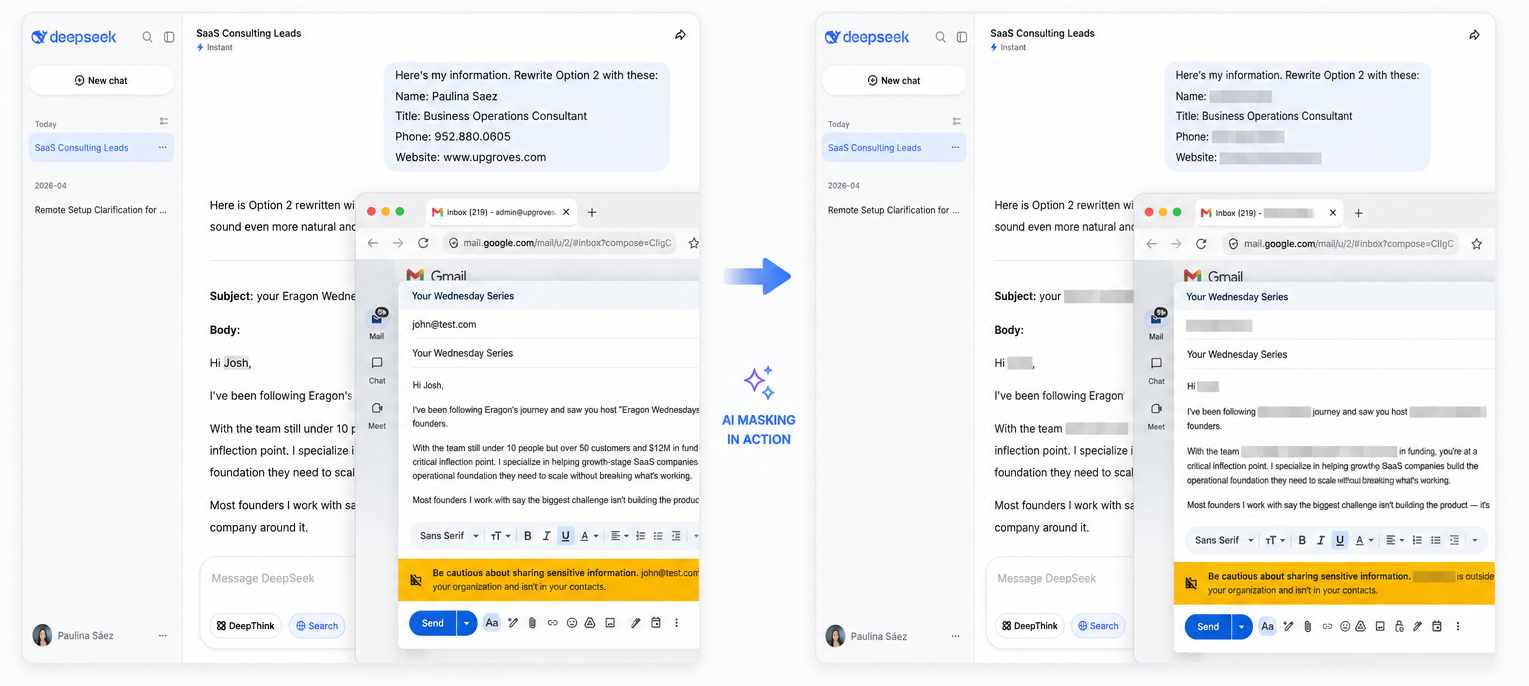
From screenshot to shareable, three moves.
Each step keeps you in control: spot sensitive details, approve the redactions, then share with confidence.
STEP · 01
Drop your screenshot
Drag and drop, paste from your clipboard, or choose a file. It opens straight into the editor.
unreviewed
4 items flagged
STEP · 02
Review detections
See exactly what we found — emails, phone numbers, API keys, and names — and choose what gets redacted.
STEP · 03
Export clean
Download or copy a share-ready image with permanent redactions. Nothing recoverable goes out.
ready to share
Be first in line
Two ways to be part of this.
Get notified at launch, or back it now and skip the line entirely.
Get early access
We’ll let you know the moment Screenshot Masking is ready to try. No spam.
Support development
Back the project on Ko-fi and get lifetime early access when it launches.
Support on Ko-fiOne-time or recurring, your choice.